

Ask Aida about your numbers
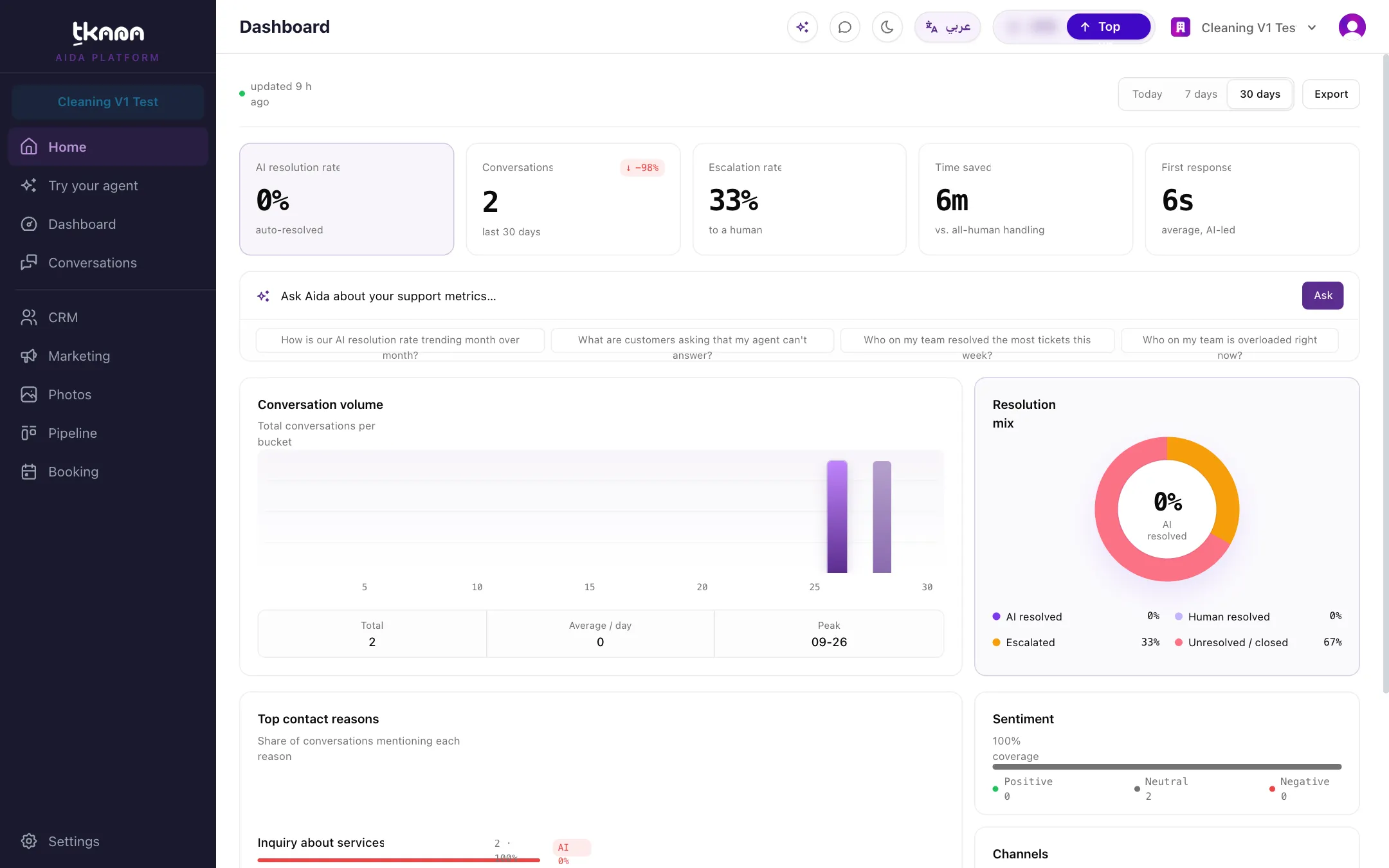
Aida can read back the numbers behind your dashboard and turn them into a short answer, so you don’t have to work them out yourself. She uses the same data your Dashboard shows, so her figures match the cards you see there.
Start from the Dashboard
Section titled “Start from the Dashboard”The Dashboard has its own Aida box under the key numbers. Type a question in Ask Aida about your support metrics… and press Enter or click Ask, or click one of the suggestions under it. Aida opens on the side and answers there. You can also open Aida from the sparkle button in the top bar and ask the same questions from any page.
Your AI resolution rate
Section titled “Your AI resolution rate”Ask how your AI resolution rate is doing, or how it has moved over time:
- “How is our AI resolution rate trending month over month?”
- “Is the AI resolving more this month than last?”
- “How did the AI do this week compared to last week?”
- “Show me the trend over the last 6 months.”
How to read her answer:
- The rate is the share of finished conversations that your AI agent resolved on its own. Conversations that are still open are not counted. Aida gives the rate together with the counts behind it, for example “62% (62 of 100 finished conversations)”.
- Periods are rolling, not calendar months. “This month” means the last 30 days and “last month” the 30 days before that. Aida gives you the exact dates.
- Changes are in percentage points. Going from 58% to 62% is “up 4 points”.
- No data means no rate. If nothing finished in a period, Aida says so instead of showing 0%.
- She says how much the rate moved, not why. To find the reasons, ask her what customers are asking about or to check for knowledge gaps.
What your customers are asking about
Section titled “What your customers are asking about”Ask:
- “What are customers asking about?”
- “What are my customers’ biggest pain points?”
- “Which topics lead to the most escalations?”
Aida lists your top contact reasons with how often they come up, then the pain points worth your attention, such as topics with negative sentiment, escalations, or customers contacting you again. These come from the same data as the Top contact reasons and Top customer pain points cards. See Understand contact reasons, pain points, and sentiment.
Topics are read from conversations that have a summary, so Aida tells you when the picture is still incomplete. Shares can add up to more than 100% because one conversation can mention several topics.
How your team is doing (owners only)
Section titled “How your team is doing (owners only)”If you are the account owner, you can ask about your team:
- “Who on my team resolved the most tickets this week?”
- “How did Sara do this month?”
- “Who has the most open tickets right now?”
- “Who is on my team?”
Aida states the numbers and leaves the judgement to you. People with the same count share a rank, and someone who finished nothing is not ranked. The ranking covers tickets only; it does not count conversations or escalations handled per person.
Quick counts about your work
Section titled “Quick counts about your work”Aida can also count what is open right now, for example:
- “How many tickets are open right now, and how many are unassigned?”
- “Which open conversations need a human right now?”
- “Which bookings are still waiting to be confirmed?”
See Ask about customers, tickets, and bookings for more.
Was this article helpful?
Thanks for the feedback, it helps us improve these guides.