

Set your agent's name, greeting, and tone
Your agent’s identity is what your customers notice first: its name, how it greets them, and how it sounds. You set these once for all your channels.
Change your agent’s identity
Section titled “Change your agent’s identity”-
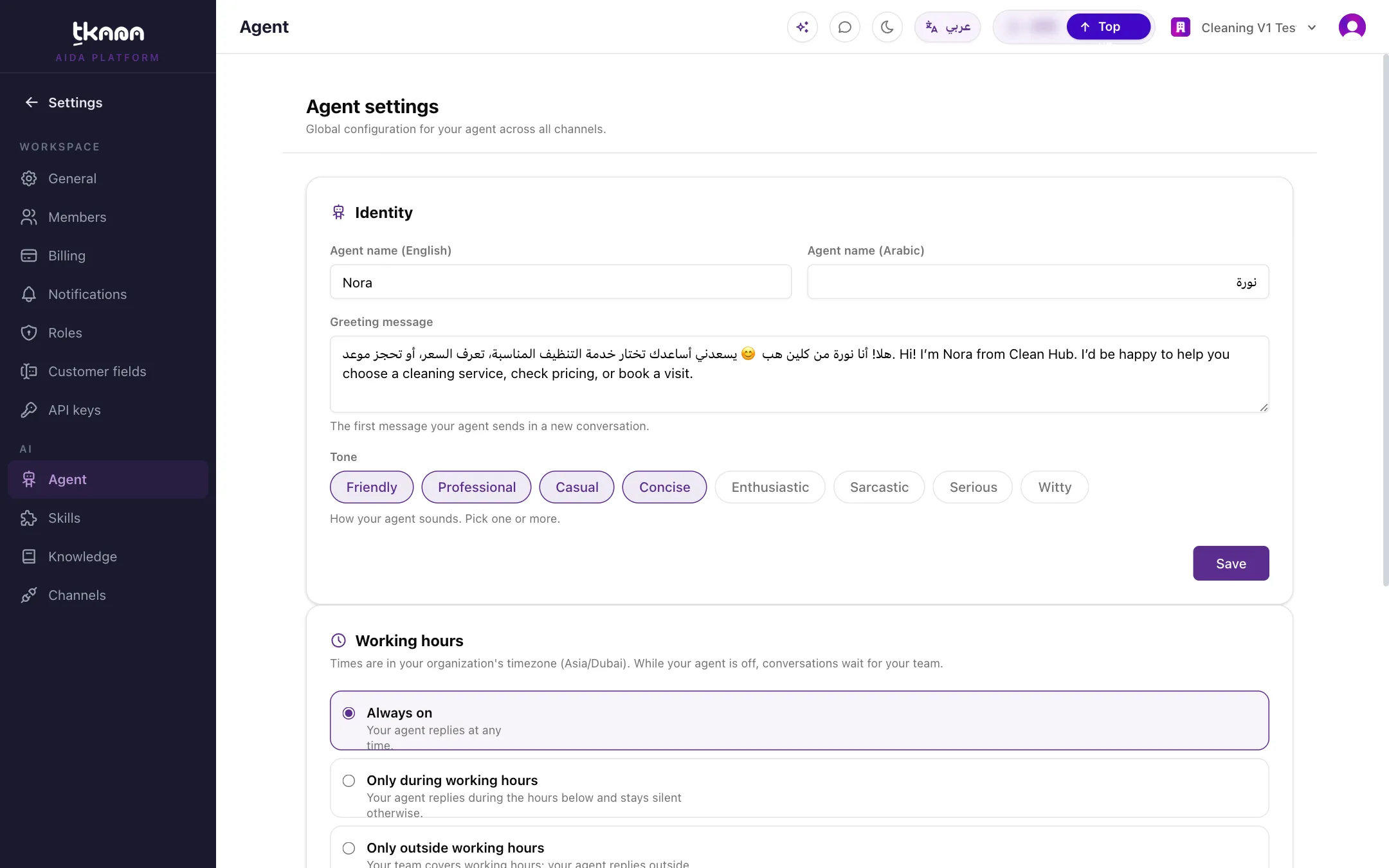
Go to Settings, then under AI click Agent. The Agent settings page opens.
-
In the Identity card, fill in:
- Agent name (English) and Agent name (Arabic): the name your agent uses with customers in each language.
- Greeting message: the first message your agent sends in a new conversation.
- Tone: how your agent sounds. Pick one or more, such as Friendly, Professional, Casual, or Concise.
-
Click Save. The change applies to your agent on every channel.
Pick a tone that fits your business
Section titled “Pick a tone that fits your business”- A clinic or a law firm usually does well with Professional and Concise.
- A café, salon, or shop can use Friendly or Casual.
- Mixing tones works: Friendly and Professional together is a common choice.
Tone changes how your agent phrases its answers, not what it knows. To change what it says about your business, update your knowledge base. See Understand your knowledge base.
Related
Section titled “Related”Was this article helpful?
Thanks for the feedback, it helps us improve these guides.
Need more help?