

Salla · Order tracking
What it does
Section titled “What it does”“Where is my order?” is the most common question any store gets. With Salla · Order tracking, your assistant finds the customer’s order in your Salla store and tells them its status, items, total, and shipping details, straight from your records. Your team stops answering the same question over and over.
Good for
Section titled “Good for”Any store that sells and ships through Salla.
Works automatically
Section titled “Works automatically”There is nothing to install or turn on. This skill is set up for your store automatically when you install tkana from the Salla app store, and it does not appear on the Skills tab, which only lists optional skills.
To share shipping details, they need to be recorded in Salla. Your assistant can only share the courier, tracking number, or tracking link if your store or the courier has added them.
What your customers experience
Section titled “What your customers experience”Customer: Hi, where is my order?
Assistant: I found your latest order, #218734 from 12 September: 2 items, SAR 312 total. It shipped with the courier, tracking number 5829301. Here’s the tracking link.
Customer: And my order before that?
Assistant: Order #217102 from 28 August was delivered. Would you like its details?
What happens behind the scenes
Section titled “What happens behind the scenes”- Recognizes the customer from the phone number they message from, so they don’t have to type it again.
- Finds the order by order number, reference number, or phone number, and lists the customer’s past orders when asked.
- Shares the status, items, total, and shipping details: courier, tracking number, shipment status, and tracking link when available. If the order hasn’t shipped yet, it says so.
- Shares the payment link if the order is still waiting for payment, because unpaid orders don’t ship.
- Apologizes and records the issue for your team when an order is late or missing, or the customer is upset.
Your assistant never guesses a delivery date the courier hasn’t given, and never shares another customer’s details.
Check the order yourself
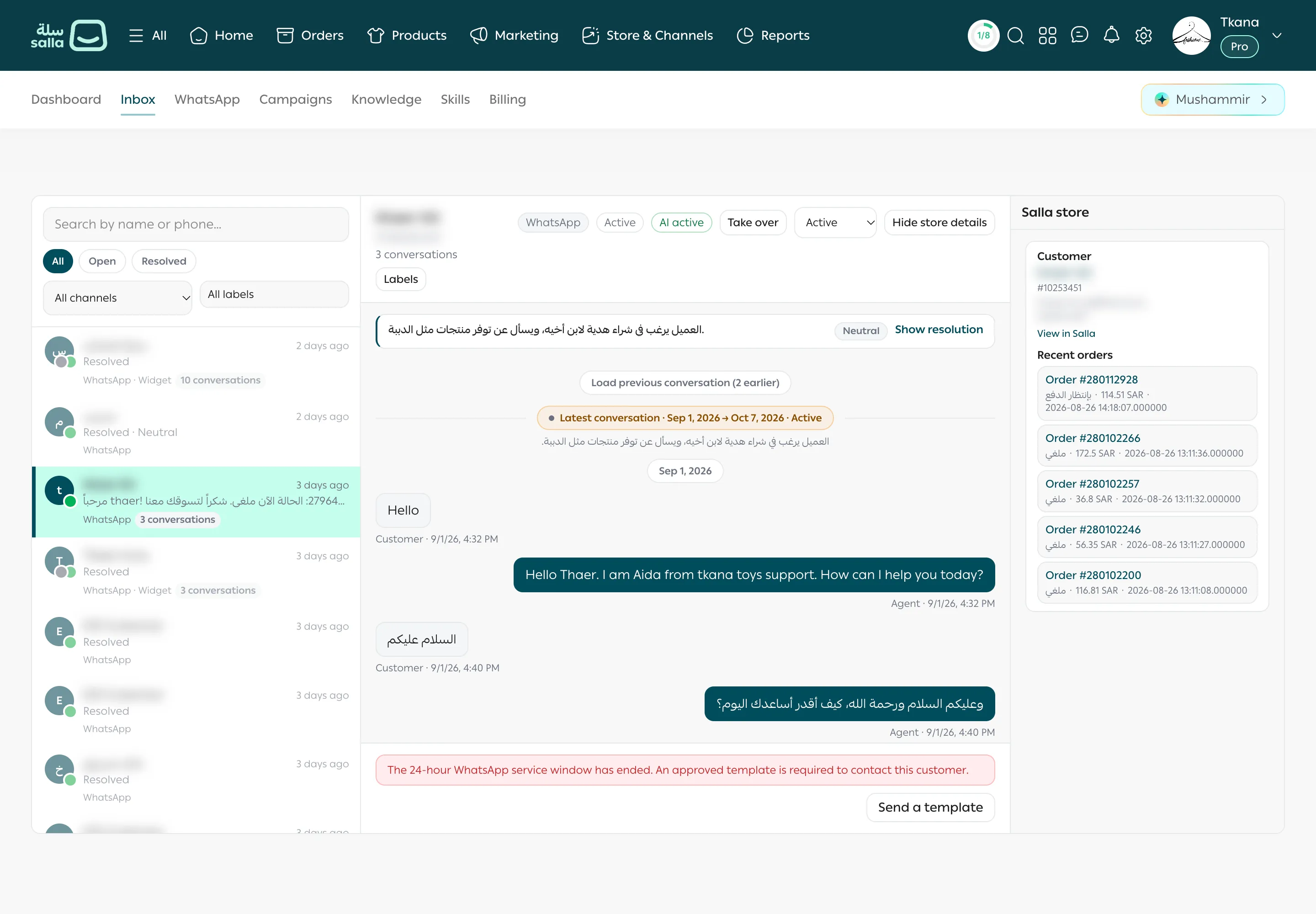
Section titled “Check the order yourself”When you open a conversation in the Inbox, the Salla store panel beside it shows the customer’s details and Recent orders, and each order opens in your Salla dashboard. You can check what your assistant told the customer, or chase a late order yourself. See Open a conversation and see the customer’s orders.
Settings
Section titled “Settings”This skill has no settings.
Tips and limits
Section titled “Tips and limits”- Delivery dates come only from the courier. If the courier doesn’t provide an estimate, your assistant won’t give one.
- To keep customers informed before they ask, turn on Salla notifications from the WhatsApp tab.
- To have someone on your team handle an upset customer whose order is late, take over the conversation from the Inbox. See Reply and take over from the assistant.
Was this article helpful?
Thanks for the feedback, it helps us improve these guides.